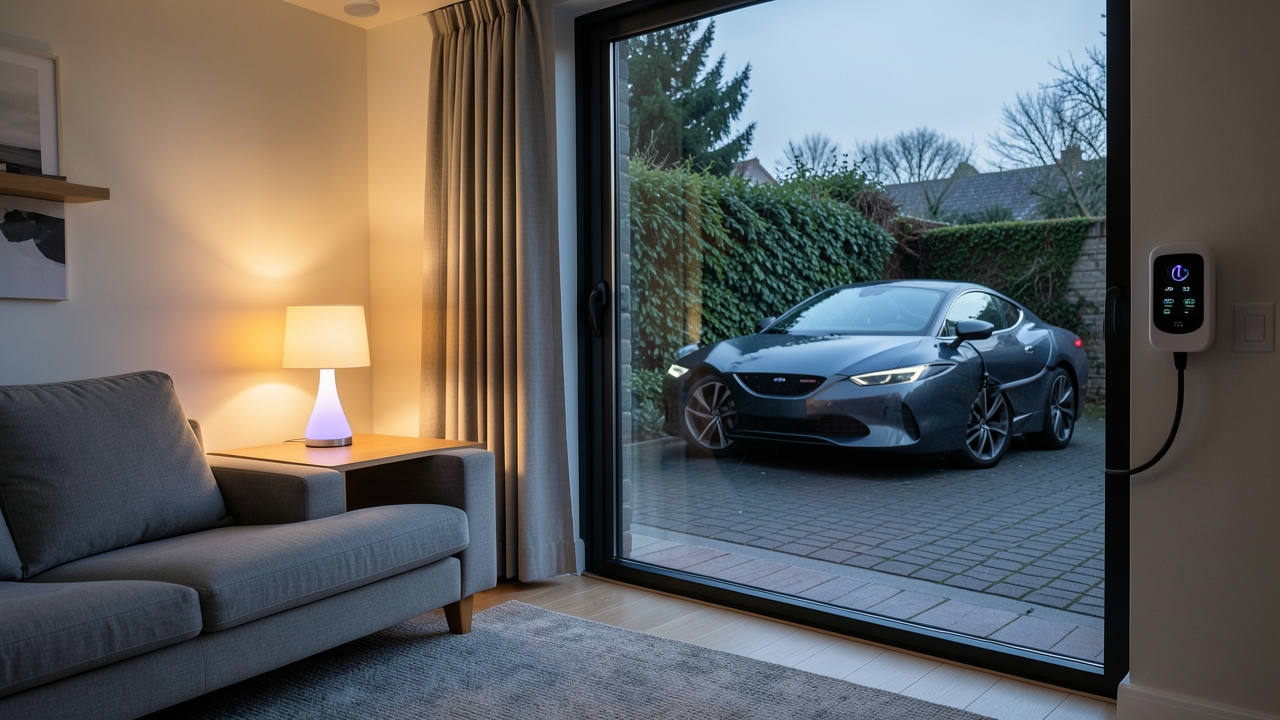
Imagine your living room lights automatically dimming as your electric car begins its overnight charge, or flashing a gentle green pulse when charging completes. This isn’t science fiction; it’s a practical reality of Philips Hue EV integration. In the UK, as we race towards our 2035 ban on new petrol and diesel cars, this synergy offers a powerful way to manage household energy intelligently.
Why Connect Your Philips Hue System to Your EV Charger?
The core benefit is automated energy awareness and management. Your EV is likely the largest single electrical load in your home. By integrating it with your smart lighting, you create visible, intuitive cues about your energy consumption and charging status. This goes far beyond mere convenience.
Key Advantages for UK Households
- Visual Charging Status: Instead of checking an app, a simple colour change in your room tells you the car’s state. For example, blue for charging, green for complete.
- Cost Optimisation: Many smart tariffs, like Octopus Energy’s Intelligent tariff, offer ultra-low rates during off-peak hours (typically overnight). You can trigger Hue routines to begin charging only when these cheap rates are active.
- Enhanced Safety: Create automations that turn on porch or driveway lights when the charger is plugged in at night.
- Energy Saving Mindset: Visual reminders of high-load activities can encourage more mindful usage patterns overall.
Furthermore, this integration doesn’t require expensive, dedicated hardware. For most users, it involves clever use of existing smart home platforms and apps to create “routines” or “scenes” that talk to each other.
How to Achieve Philips Hue EV Integration
The most common and flexible method is to use a third-party smart home hub or automation platform as the “middleman” between your Hue system and your EV charger’s app. Here’s a step-by-step approach:
Step 1: Choose Your Central Smart Hub
You need a system that can connect to both Philips Hue and your specific EV charger’s API. Popular choices in the UK include:
- Home Assistant: An open-source powerhouse that supports a vast range of devices. It has dedicated integrations for both Philips Hue and many chargers, including Ohme, Pod Point, and wallbox.
- Apple HomeKit: If you’re in the Apple ecosystem, HomeKit can natively control Hue. For EV integration, you would need a HomeKit-compatible charger or use a workaround with a HomeKit-bridged device.
- Google Home / Alexa: While less natively integrated for this specific task, you can often create routines within their apps that respond to triggers from your charger’s service via IFTTT (If This Then That).
Step 2: Set Up the Automation Logic
Let’s use Home Assistant as an example, as it offers the deepest customisation. You would create an “automation” with a trigger and an action.
Trigger: “When my EV charger status changes to ‘Charging'”
Action: “Turn on my Hallway Light to 50% brightness and set colour to Blue”
Conversely, another automation could trigger when charging stops:
Trigger: “When my EV charger status changes to ‘Idle’ and battery percentage is 100”
Action: “Turn on Hallway Light to 100% brightness and set colour to Green for 1 minute”
Step 3: Link to Smart Tariffs
For true automated energy management, connect your smart tariff. Home Assistant can pull your electricity rate schedule from providers like Octopus Energy. You can then create an automation that only allows the EV charger to activate when the rate is below a certain threshold, say 7p/kWh. This is the pinnacle of Philips Hue EV integration for cost saving.
Example Automations and Routines
Here are some practical ideas you can implement:
- The “Overnight Charge” Sync: Programme a Hue “Sleep” scene in your bedroom to activate only when the EV charger is confirmed to be running during off-peak hours. This provides peace of mind.
- The “Ready to Go” Alert: Set your kitchen lights to flash amber for 30 seconds when the car’s battery reaches 80%, a common daily charge target for many drivers.
- The “Energy Saver” Reminder: Have a Hue bulb turn red for 5 minutes if the car is plugged in but not scheduled to charge. This nudges you to check your scheduling or plug in properly.
- Guest Mode: If you’re having guests, create a routine that prevents the driveway lights from turning on with every charger connection, avoiding unnecessary annoyance.
In addition, you can combine these with other sensors. For instance, a motion sensor in the driveway could turn on lights when you arrive home, which then automatically adjust their behaviour once you plug in your car.
Considerations and Costs
This level of integration is highly accessible. The primary costs are the hardware you may already own:
- Philips Hue Starter Kits: From approximately £60 for a bulb and bridge.
- Smart EV Charger: With the EV chargepoint grant now ended for most homeowners, a fully installed smart charger typically costs between £800 – £1,500.
- Home Assistant Hub: A Raspberry Pi setup can be done for under £100. Commercial hubs like the Home Assistant Yellow are around £125.
However, the main investment is your time to learn the automation platform. The results, though, are a uniquely responsive and efficient home environment. For a deeper dive into the hardware side, explore our guide to the best smart EV chargers in the UK, many of which are ripe for this type of integration.
According to Energy Saving Trust, smart charging can save the average UK EV owner up to £100 per year by optimising charge times. Integrating with visible smart lighting makes this saving effortless and intuitive.
The Future: A Fully Connected Energy Ecosystem
Think beyond just your EV. Imagine a future where your solar panels, home battery, EV charger, and smart lighting all communicate. Your Hue lights could glow brighter when your battery is full and solar generation is high, signalling it’s a great time to run high-load appliances. Philips Hue EV integration is the first, highly visible step into this connected ecosystem.
As smart home technology in the UK matures, these automations will move from enthusiast projects to standard features. Starting now with your Philips Hue system and EV charger puts you at the forefront of this energy revolution.
Have you tried linking your smart lights with your EV charger, or are you planning to give it a go? Share your setup ideas or questions in the comments below!